
A wiremap check confirms that each conductor landed in the right pin, but it cannot tell you whether the connector will still work after two years. Its durability depends on the contact finish, the housing, how the plug fits the jack, and whether the connector matches the cable.
A connector that passes a wiremap check during installation can still fail early if the plating wears, the housing cracks, or the crimp does not match the cable. In this guide, we’ll discuss what you need to check before you buy RJ45 connectors.
Why Durability Matters in RJ45 Connectors
If your connection becomes unstable, one of the first places you should check is the connector.
A dead port is often caused by a cable break, while a degraded connector can cause intermittent drops, low speeds, or links that work at 100 Mbps instead of Gigabit. When the problem becomes obvious, the connector may already be behind a wall plate or in a patch panel with other ports that look identical.
The three most common reasons for connector problems are contact surface degradation, broken locking tabs, and plugs that fit the jack too loosely.
- Contact degradation happens when the exposed base metal corrodes or oxidizes, increasing electrical resistance at the contact point. The link may stay up, but the signal margin shrinks. On a run that is already working near its limits, this is enough to cause problems.
- Broken or cracked locking tabs are housing failures because the tab is part of the connector body. When the locking tab (that small plastic clip that locks the plug into the jack) snaps, the plug can come loose under normal handling. Every small shift changes how the contact pins engage inside the jack, and those shifts can produce intermittent failures.
- Loose fits at the plug-to-jack interface create contact stability problems. A plug that wobbles in the jack puts too much load on the locking tab, and this can change how the contacts engage during regular use. Correct tolerances help the plug seat firmly without excessive movement.
Those three types of issues tell you what to look for before you buy or crimp a connector.
Expert Tip: Before buying connectors from an unfamiliar supplier, test-crimp two or three of them onto scrap cable, then plug each one into a jack and pull it out several times while verifying that the locking tab holds firm. A loose fit or a tab that deforms the second or third time you pull it out tells you more than a specification sheet.
Contact Materials
The contact pins inside an RJ45 connector carry the signal from the plug to the jack. Their surface material determines how well they conduct after months or years of real use.
The three plating options you will find are:
- Bare or poorly plated contacts: Avoid connectors that do not state the contact finish. When exposed copper alloy reaches air and moisture, it can oxidize and this surface layer can increase resistance at the contact point. Avoid using connectors with exposed or poorly specified contact plating in permanent installs.
- Nickel-plated contacts: These are more corrosion-resistant than bare copper and can work well in dry and stable indoor environments. In high-humidity environments, nickel can corrode over a long service life, so it is less suitable than gold for connectors that will be plugged and unplugged frequently.
- Gold-plated contacts: Gold is corrosion-resistant, so a properly specified gold finish helps keep contact resistance stable across the connector’s rated service life. Gold-plated contacts are the safer option for permanent runs where you expect repeated insertions, humidity, or higher contact stress. For outdoor or Power over Ethernet (PoE) runs, plating alone is not enough. The connector also needs to have the proper mechanical design and, when outdoors, a sealed housing system is required as well.
Plating thickness is measured in micro-inches (μin). Flash gold, typically under 10 μin, is porous and oxygen and moisture can reach the base metal. At 50 μin, the thickness reduces porosity and improves wear resistance across repeated plug cycles.
Expert Tip: Check the plating thickness in the product specification sheet before buying. Connectors simply labeled as "gold-plated" but without a stated thickness may only have a thin flash layer.
The base material under the gold plays an important role, too. Phosphor bronze is a common base material for RJ45 contacts because this alloy helps the contact keep its spring force over repeated insertions.
What does gold plating actually do in an RJ45 connector?
Gold is like a physical barrier on the contact surface. Without it, the copper below reacts with oxygen and moisture, creating an oxide layer that increases resistance and reduces contact performance over time.
Thin flash gold can slow down that process, but it can wear faster than a thicker finish. A thicker contact finish, such as 50 μin gold, gives the connector more wear margin across repeated insertions.
Expert Tip: When reviewing a connector's specifications, look for the plating thickness in micro-inches (μin) or micrometers (μm). 50 μin is around 1.27 μm. If you do not find any stated thickness for the connector you are considering, look for a better-specified alternative.
Housing Material and Build Quality
The housing is the plastic body of the connector. It is what holds the contact pins in position, carries the locking tab, and absorbs the mechanical force of every insertion and extraction. The quality of the housing directly determines how many insertion-extraction cycles the connector supports before its tab breaks or its body deforms and starts affecting contact alignment.
When checking the housing, look at the named material first, and then examine the quality of the molded body:
Polycarbonate: It is widely used in RJ45 plugs because it keeps its shape across a wide temperature range and gives the locking tab enough flexibility to resist cracking under repeated bending. If the housing material is not named, be cautious. If a tab cracks or stays bent, it will not hold the plug securely.
Unlabeled or brittle plastics: Be careful when the listing does not name the housing material. They can feel similar to polycarbonate in hand, but they may crack, stay bent, or lose spring tension after repeated use.
Before buying an RJ45 connector, check these two structural details:
- Check that the conductor channels guide the conductors smoothly to the front of the plug. When they are too narrow, the conductors may not seat fully, and the crimp blades may not pierce the insulation cleanly. If they have rough edges, they might damage the insulation.
- Confirm if the back side of the connector grips the cable jacket without excessive slack. If the jacket moves, the cable’s movement transfers to the termination point instead of being absorbed by the housing.
Expert Tip: Before installing your connector, press the locking tab. It should return to its original position. If it stays depressed or feels like it might snap under light pressure, the housing plastic will not withstand repeated plug cycles in an installation.
Mechanical Design and Fit
A good RJ45 connector should seat firmly, lock cleanly, and protect the crimp from cable movement. Even if the contacts and housing are good, poor fit can still cause intermittent drops.
Start with the plug-to-jack fit. The plug should slide into the jack without forcing it, then stay seated without wobbling. Touch the cable and the plug should not move. If it does, the plug movement can change how the contacts engage inside the jack, which can cause intermittent drops.
The locking tab is also important. The locking tab should click firmly into place and release only when you press it deliberately. A weak click or a tab that looks too flat means the plug will loosen with normal handling.
Strain relief protects the termination point. The termination point is where the connector’s crimp blades pierce the conductor insulation and make contact with the copper. A well-fit connector grips the cable jacket so that pulling or bending the cable does not transfer force directly to the crimp. A boot can add extra support behind the plug, especially on patch cords that move often.
IEC 60603-7 and ANSI/TIA-1096-A set the dimensional requirements for plug fit and contact alignment. Connectors built to those requirements are more likely to seat consistently across compliant jacks. You do not need to memorize those standards; just know that they control plug size, fit, and contact alignment.
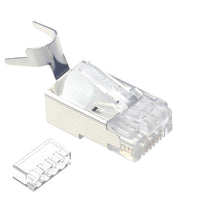
Installer’s Note: Pass-through plugs need a compatible crimp-and-trim tool that cuts the conductors flush at the plug face. Multi-piece plugs with a load bar can help keep conductor order steady, especially with thicker Cat6 and Cat6A conductors.
Expert Tip: After crimping one connector, plug it into a known-good jack and listen for a clean click. Then move the cable lightly. If the plug shifts, feels loose, or loses link, do not use that connector for the rest of the run.
Crimping Compatibility and Performance
Using a connector that was not designed can create a hidden failure point. The problem is that you can’t see the mismatch once the tool has done its job. When a connector does not match the cable, the crimp blades may not pierce the conductor insulation cleanly, and the contacts may not seat deeply enough. The wiremap could either show intermittent opens or pass at first and fail later.
The mismatch is not visible after crimping. It shows up in testing or after a few weeks in service.
For the crimp to actually succeed, you need to match two specific factors:
- Conductor type (solid vs. stranded)
- Conductor gauge (the thickness of the wire)
When we talk about conductor type, we refer to whether the wire is solid or stranded.
Solid conductors are a single, stiff copper wire for each position. They are used for bulk Ethernet runs inside ceilings or walls where the cable stays put.
Stranded conductors are made of several tiny copper threads twisted together. This makes the cable more flexible, which is why they are the standard for patch cords that are constantly plugged or unplugged.
The crimp blades inside your connector must match the conductor type; they are specifically designed for one or the other. If you mix them, you might initially get a “pass” on your tester, but the connection can fail later, as soon as the cable is handled or moved.
Understanding conductor gauge (AWG)
The thickness of the wires is measured in American Wire Gauge (AWG), and a higher number means a thinner wire. Although there are standard sizes, you should always double-check the printing on the cable jacket.
Cat5e bulk cable is generally 24 AWG, Cat6 23 AWG, and Cat6A may use 23 or 22 AWG (but you should always check the cable jacket or manufacturer’s specifications).
Expert Tip: Always confirm the connector’s AWG range matches your cable gauge range before you buy.
Does conductor type, solid or stranded, change which RJ45 connector you need?
Yes, and using the wrong conductor type is one of the most common causes of hidden connector failures.
Since the internal wires behave differently, the contact blades in the connector housing must be specifically designed to match them.
Solid and stranded conductors need different contact blades inside the crimp housing.
- Solid-rated blades are built to cut through the single insulated conductor and make contact with the thick copper core.
- Stranded-rated blades are built to engage numerous fine strands to make contact without accidentally damaging them.
The risk of using a solid-rated blade on a stranded cable is that it can eventually cut through the strands as the cable moves. If you use a stranded-rated blade on a solid cable, it may not cut deep enough through the insulation, leaving you with a weak connection that may not maintain stable contact.
Although some connectors are rated for both types or marketed as “universal”, always verify this rather than assuming the product is universally compatible based solely on its description.
Expert Tip: If the AWG or conductor type is not listed on the packaging, check a stripped wire against a gauge card before buying the connectors.
Corrosion Resistance and Environmental Durability
Most RJ45 connectors are only built for dry, stable indoor spots. In those conditions, if you use a properly crimped good connector with 50 μin gold contacts, it can last for years.
The real problems start when moisture reaches the contact surface or, worse, the base metal underneath the plating. This is usually due to thin plating, a loose housing fit, or a poor seal around the cable jacket. Dust can worsen the problem because it can hold the moisture against the metal contact area.
If you are working in a damp indoor area, choose 50 μin gold-plated contacts, a firm grip on the jacket, and a boot or housing that seals the cable entry. For direct moisture exposure, do not rely on a standard indoor plug.
IP ratings for humid environments
Outdoor and high-moisture installations need an Ingress Protection (IP) rating. IP is a system defined by IEC 60529 that tells you how much water and dust ingress an enclosure can resist. For example:
- IP67 indicates dust-tight protection and temporary immersion.
- IP68 means it is designed to withstand continuous immersion deeper than 1 meter (although you should check the exact depth and time specified by the manufacturer).
For outdoor runs, a standard RJ45 plug is a poor choice because the housing is not sealed against moisture ingress. For outdoor systems, the seal at the cable entry is as important as the gold plating on the contacts.
Expert Tip: If your connector will be exposed to moisture, opt for a sealed housing rated at IP67 or higher. Do not rely on gold plating alone to protect an unsealed plug.
Signs of a Low-Quality RJ45 Connector
You can usually spot a low-quality connector by doing a quick physical inspection before crimping. These are the specific things to look for:
- Missing plating or vague thickness specification: The listing should state the contact finish in micro-inches (μin) or micrometers (μm). If it only says “gold-plated,” the information is incomplete.
- Contact surface appearance: Take a close look at the pins. The gold-plated contact area should look uniformly colored and reflective. If the gold looks patchy, uneven across the eight contact pins, the plating is probably too thin. The stated plating thickness is the only reliable way to confirm the grade.
- Missing AWG range: A good connector should list the wire sizes it handles. If the plug does not match your cable gauge, the crimp may not seat properly.
- Weak locking tab: Press the tab down and release it. It should spring back. If it stays bent or feels brittle, the plug may not stay locked or even fall out of the jack.
- Poor conductor channel fit: The conductor should slide into the channel easily, without forcing, binding, or moving out of alignment. A tight channel can prevent the conductor from seating, and a loose channel can make alignment harder.
- Locking tab shape: Look at the tab from the side. You should see a defined angle and a clear engagement point at the tip. A flat or rounded tab at the tip may not catch the jack's latch reliably.
- Hidden or unclear category ratings: The connector should explicitly state the cable category it supports. Do not assume a plug works for Cat6A just because it fits the cable.
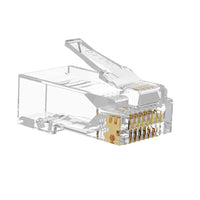
- Transparency: Many connectors use a clear polycarbonate housing so you can check the conductor order before crimping. An opaque housing does not necessarily mean poor quality, but this limits the visual check that can let you spot wiring errors before the crimp. Keep an eye out for bubbles, rough edges, or visible molding defects near the conductor channels; these are typical signs of poor manufacturing.
Expert Tip: Test a small sample before buying in bulk. Crimp a few connectors on your cable, test them, then plug and unplug each one several times to check tab retention. Testing ten connectors will cost you less than re-terminating a full panel later.
Common Mistakes to Avoid
A poor termination can shorten the connector’s service life even if you bought quality, durable connectors. Make sure to avoid these mistakes before you crimp.
- Over-untwisting the pairs: Keep the untwisted length as short as possible. Per ANSI/TIA-568 series, 0.5 in (12.7 mm) is the maximum for Cat5e through Cat6A.
- Using the wrong connector for the conductor type: Match the plug to solid or stranded cable. A solid-rated blade can damage stranded conductors, while a stranded-rated blade may not grip solid conductors firmly enough.
- Skipping strain relief on movable patch cords: If the cable will be handled often, use a boot. It limits sharp bending at the plug exit and reduces stress on the crimp.
- Storing connectors loose in damp areas: Keep unused plugs sealed and dry. Humidity can affect exposed contacts before the connector is ever crimped.
- Reusing a connector after a bad crimp: Cut the plug off and start with a new one. Once the contacts are crimped, the plug should not be reused.
Expert Tip: Store your unused connectors in a resealable plastic bag with a desiccant pack if you are storing them in a garage, basement, or work truck.
Conclusion
The connector is one of the easiest failure risks to reduce in a permanent Ethernet run, and the best time to reduce that risk is before you buy. Match the plating grade, housing material, conductor type rating, and gauge range to your cable and your environment before you buy.
When you pick up a new bag of connectors, run through the five-point check: tab spring response, conductor channel fit, stated plating thickness, AWG range on the spec sheet, and locking tab engagement geometry. Thirty seconds of inspection before you open the bag is faster than diagnosing an intermittent drop six months after the wall is closed.
Choose the connector that matches your cable, environment, and installation type, not just the one that looks cheapest or easiest to buy.



Geben Sie als Erster einen Kommentar ab.
Hinterlasse einen Kommentar